Tech Administrator is a legacy API user. This role enables the functionality to create and edit Reporting Administrators and Reporting Users. They have access to the TRANSACTION SEARCH module in the navigation bar along with extra functionality related to API security in ACCOUNT SETTINGS, such as managing API passwords, IP allow-listing and their allowed-country list.
To generate API credentials, make sure that you are using an account with Tech Admin role.
- Log into https://www.dingconnect.com/
- Click on Account Settings > Developer or go to this link directly - https://www.dingconnect.com/en-US/ActMgmt/Developer
- You’ll be presented with the following screenshot
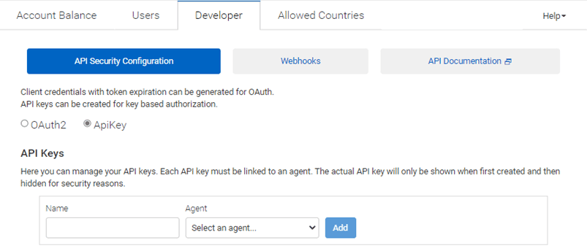
Enter a name, select an available agent & click on the button to generate an API key for that user. You can now use the provided credentials on Postman to verify it.